Hey!
So, how did you like my 100% serious April 1st post? I hope your hopes and dreams weren’t crushed when you realized what day it was.
This post is kinda like a follow-up to the first post on this blog. The section about future plans and what I’m working on turned out to be very short. Since that is probably the most (if not the only) thing you’re interested in, I felt that this is the next topic I needed to address.
As always, if you have any questions about the topic or the format of these posts, please ask them on the Discord server! These posts will replace (most of) the Discord announcements, so I need to know if you’re okay with them.
Advanced Skript language features
SkEditor mostly relied on syntax highlighting, generators, and simple refactoring tools. That’s all. For an average programming language, that would be pretty… basic. For Skript? Not so much. At least, some time ago.
The revolutionary moment for the app was when the Analyzer was released, thanks to the work of Glicz. For many people, it’s probably the number one reason to use SkEditor. The 100% accurate in-app error checking, with the support of pretty much all the addons, was game-changing.
The problem? Analyzer is an addon itself. You don’t get it out-of-the-box after installing SkEditor. It also feels a bit alien. So, the first thing I can announce is that the Analyzer will be built into the app, providing a much more consistent and improved overall experience.
Also, over a year ago we announced Skript Profiler, a new tool that lets you analyze the runtime speed of your code. You haven’t heard any news about it since then - that’s because there was no news to share… However, the integration of the Analyzer into the app will certainly set the ground for the Skript Profiler. That’s all I can say about it for now, but I hope I can share more news about it soon!
Anything else?
Well, other than the Analyzer, there are no other advanced features in the app as of now. There is only a simple “code parser” in the app that I didn’t write myself and was never completed. The refactoring tools were written in a few minutes and often aren’t really helpful. The autocomplete feature was left as an experimental prototype for years.
A “secret” project
For the past two weeks, I didn’t work on SkEditor directly. No architectural work, no new changes, no new features. So, what, did I just do nothing?!
I’m exploring an idea, a thought that struck me recently. If I succeed… well, that will change a lot. I know I said this post will be about the future of SkEditor, but I don’t want to share this idea just yet. I think it’s best to “underpromise and overdeliver” in this case.
Anyway, it’s not just an idea anymore. I’ve already spent around 40 hours on it at the time of writing this, and I can say that it’s going pretty well! It really looks like I’ll be able to finish it in the form I imagined; please keep your fingers crossed for me!
Where are the delayed features?
If you’ve followed SkEditor development for some time, you may remember two really, really delayed features: TextMate format and SkDoc. Visual Studio Code, and many other editors, use TextMate grammars to define how to highlight the code. Currently, SkEditor uses the original AvalonEdit format, which is outdated and limited. That’s why I decided to move to TextMate, which is simpler, newer, and more powerful. It will also allow me to include syntax highlighting support for pretty much all the languages that the default VS Code has.
The second thing, SkDoc, was meant to be an innovative feature allowing you to document your code.

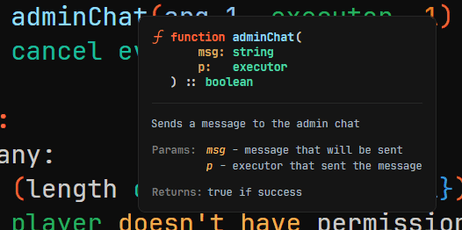
Both screenshots were taken in-app, with both features working (at least at the level you see above), and their pull request was opened on May 19, 2024… What went wrong? I shifted my priorities, and it was left unfinished to this day…
This is not something I can just ignore. These are features that we need. They will be included in the next update.
Multiple instance support
When you open SkEditor, one and only one instance is going to be used until you close it. When you open a file, it opens in the previously opened app window, not a new one. That’s mostly a good thing, but it’s a problem when, for example, you want to see two scripts at the same time. There is no “split tabs” feature, and you can’t open two SkEditors - so you just can’t do that.
Multiple instance support could be added in a trivial way. I could just allow it. The problems arise when we think about the practical functionality. For example, a user has 2 SkEditors open, and opens a file by double-clicking it in the explorer. Where should it open? How can one instance know that the second instance has already handled it? Properly implementing this requires a well-thought-out architecture, which, as you should know from the previous post, I am currently working on!
However, most of these workflows can be covered with a properly implemented split tab functionality. I’ll definitely look into implementing that, so I can finally cross it off the todo list.
Closing remarks
I wanted to cover the entire topic in this post. That is just… impossible. I write about one thing, and then I remind myself of ten other things. This post could be several times longer if I wanted to write about everything I want to do. I also don’t want to spend too much time on a devlog when I can actually work on these things instead.
But still, the things I described, especially in the “language features” section, are the most important ones, which I will treat as a top priority.
After I release the next huge update, the pressure will finally be released. I’ll feel much freer to talk about other things. I hope you will look forward to it :)
So, that’s all for this post. I hope it wasn’t too chaotic, as my mind surely was when writing it. Now, I can return to work, so I can finally bring these things to you.